Building a high-octane 3D racing game for iOS from the ground up requires more than just code — it demands a cohesive, end-to-end production pipeline.
From generating raw 3D mesh concepts using Hyper3D AI, to precision topology baking in Blender, to native rendering in Apple SceneKit & Metal, and deploying a high-throughput serverless backend, here is the complete story of how Velocity Unleashed was brought to life.
The Architecture at a Glance
Our goal was bold: achieve console-quality 60 FPS mobile racing with 240Hz physics simulations without relying on heavy third-party engines like Unity or Unreal.
The stack spans 4 integrated layers:
- Concept & Generation: Hyper3D AI text-to-3D and image-to-3D mesh synthesizers for rapid Formula aerodynamics prototyping
- 3D Asset Engineering: Blender 4.x for retopology, UV unwrapping, parametric track curve baking, and PBR texturing
- Client Engine: Pure Swift 5.9 + SceneKit + Metal shaders + SwiftUI overlay + AVAudioEngine procedural sound
- Cloud Backend: Next.js 14 serverless API on Linux instances for global leaderboards, ghost telemetry, and live config
Stage 1: AI-Powered 3D Prototyping with Hyper3D
Traditional 3D vehicle modeling from scratch can take weeks per concept. To explore aggressive, futuristic open-wheel designs, we used Hyper3D AI models to generate volumetric representations and raw meshes.
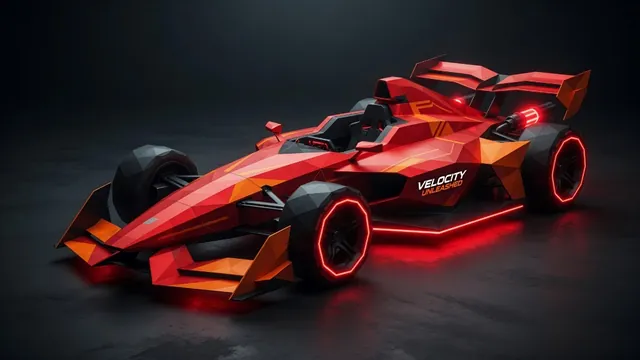
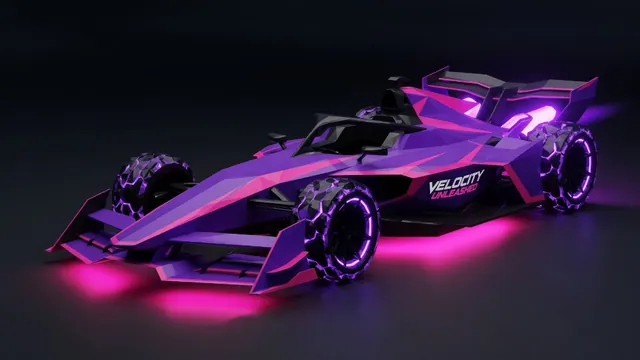
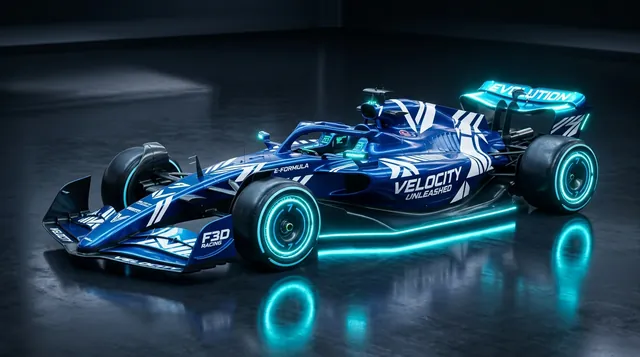
Generative Iterations We fed Hyper3D precise prompt matrices focusing on: - Low-slung Formula chassis with sculpted ground-effect venturi tunnels - Active DRS rear wings and halo cockpit safety frames - Aggressive front wings with vortex-generating endplates - Exposed suspension wishbones with glowing neon wheel rims
The AI output provided rich, high-density point clouds and rough OBJ geometry in minutes. While AI geometry isn't game-ready out of the box (often containing non-manifold geometry and dense triangle soups), it gave our art pipeline exceptional silhouette references and surface inspiration.
Stage 2: Precision Blender Engineering & Track Math
Once our base models emerged from Hyper3D, we brought them into Blender for professional game asset optimization.
1. Retopology & Quad Flow We rebuilt the meshes with clean edge loops, cutting polygon counts down from 300k+ triangles to an optimized 18,000–25,000 quads. This ensured smooth shading and optimal vertex buffer performance on mobile GPUs.
2. PBR Material Baking & Neon Emissives Each car livery was painted with 4K PBR texture maps baked down to mobile-friendly 2K atlases: - **Albedo / Base Color:** High-saturation neon paints (Electric Blue, Crimson Flame, Sunburst Yellow, Cyber Purple, Emerald Green) - **Roughness & Metallic:** Carbon fiber weaves and high-gloss clear coats - **Emission Maps:** Neon rim glows, DRS indicators, and exhaust thrust jets
3. The Parametric Track Curve Invariant One of our biggest engineering hurdles was keeping track geometry in Blender 100% aligned with the runtime Swift physics engine. We achieved this through a shared parametric mathematical formula:
angle = t × π × 2 × 1.6
x = sin(angle) × 190 + sin(angle × 2.8) × 28
z = cos(angle) × 125 + cos(angle × 2.1) × 20
y = sin(angle × 1.9) × 5.2
Both our Blender asset generator (generate_assets_v2.py) and the game engine (TrackPathMath.swift) evaluate this exact curve, ensuring cars never clip through curbs, barriers, or banked curves.
Stage 3: The iOS Engine — SceneKit, SwiftUI & Metal
On iOS, we bypassed bloated third-party runtimes to build directly on Apple's native frameworks.
Pure Swift & SceneKit Rendering SceneKit gives us direct access to Apple's Metal rendering pipeline while providing a robust scene graph: - **USDZ & SCN Pipelines:** Compressed model delivery directly into the app bundle - **Dynamic PBR Lighting:** Real-time directional sun lamps with cascaded shadow maps and environment reflection probes - **Metal Post-Processing:** Custom Metal shaders for high-speed radial blur, asphalt rain reflections, and neon bloom
240Hz Fixed-Step Physics (`VehicleDynamics.swift`) While rendering runs smoothly at 60 or 120 FPS (ProMotion), the underlying physics simulation runs at a blistering **240 Hz** using a deterministic fixed clock: - Pacejka tire grip friction models for realistic drifting and counter-steering - Aero downforce scaling quadratically with vehicle velocity - Dual-stage nitro acceleration impulse curves
Real-Time Procedural Audio Engine sounds are synthesized in real time via **AVAudioEngine**: - Multi-harmonic oscillator modulation driven by engine RPM - Dynamic exhaust backfire pops on downshifts and throttle lift - Real-time stereo panning and Doppler pitch shifts as rival cars fly past
Stage 4: High-Performance Backend Infrastructure
To support a global community of racers, we built a dedicated cloud backend:
Serverless Architecture - **Next.js 14 Engine:** Powered by Node.js, PM2 process management, and Nginx reverse proxies with full HTTP/2 and TLS 1.3 encryption. - **Game Center & Cloud Sync:** Fast, secure endpoints for ghost lap telemetry exchange, global top-100 leaderboards, and live remote feature flags. - **Sub-50ms Latency:** Optimized REST endpoints designed for quick response times on mobile networks.
The Result: True 3D Mobile Racing
By bridging cutting-edge Hyper3D generative AI, precision Blender 3D workflows, native Apple SceneKit/Metal, and a scalable cloud backend, Velocity Unleashed achieves what few mobile indie games can: lightning-fast 60 FPS performance, pinpoint responsive controls, and breathtaking neon visuals.
Ready to hit the track? Download Velocity Unleashed for free on the App Store today and experience the speed for yourself!